
Dashboard and tasks
Open and overdue work, evidence gaps and upcoming checks on one screen. Tasks have an owner, priority, due date and repeat schedule.
One place for the day-to-day work of ISO 27001, SOC 2 and IT audits: tasks, evidence, risks, policies, incidents and audits. Built for teams without a compliance department.
See it in action
No Excel files, no shared folders and no digging through old emails. Everything is entered once and found in seconds.
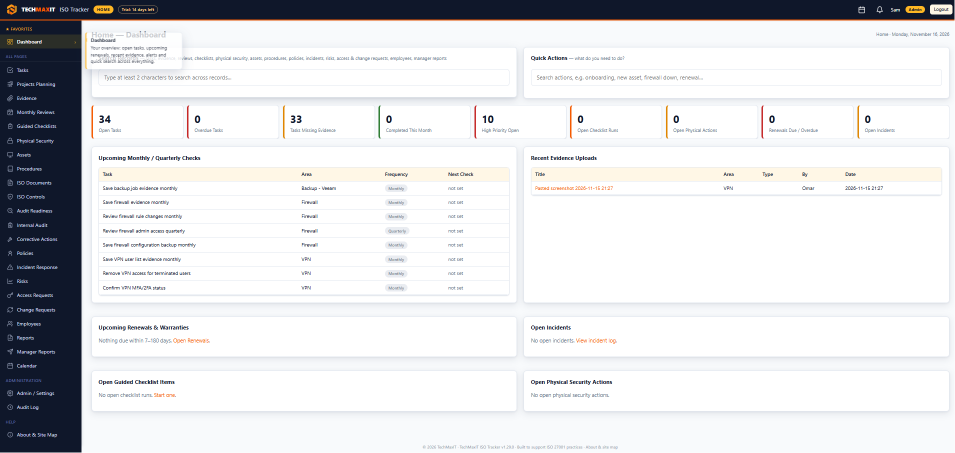
Open ISO Tracker and see what needs attention today.
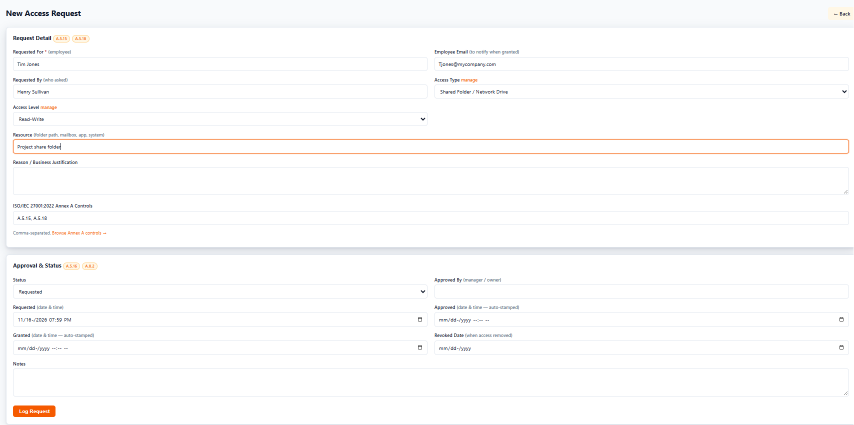
Access requests have never been easier. One short form replaces the spreadsheet and the folder of approval emails.
Plan and do the work
Open and overdue work, evidence gaps and upcoming checks on one screen. Tasks have an owner, priority, due date and repeat schedule.
Monthly reviews of VPN, firewall, backups, restore tests, endpoint security, access and logs. Due dates show on a shared calendar.
Keep IT projects on track with phases, tasks and milestones, a timeline view, progress that adds itself up, a budget estimate and a schedule status of On schedule or At risk.
Eight ready-made checklists, including onboarding, offboarding, new PC, security incident, vendor access and backup restore test.
Request, approve and record IT changes with the approval and evidence kept together. Export any change request as a PDF with your company letterhead.
Track walk-throughs, camera checks and cabinet inspections, with a check-in log of who verified what and when.
Keep the proof
Upload many files at once or paste screenshots. Each file is linked to its task, review, incident or audit and gets a SHA-256 fingerprint.
Upload your ISO policies and documents. Managers approve and sign them from a secure link, and employees confirm they have read them. Each signature records the name, date, IP address and a fingerprint of the exact file signed.
Write your runbooks for events like a firewall failure or a server going offline. Five starter runbooks are included.
Add the frameworks you need, such as ISO 27001, SOC 2, an IT audit or your own requirements, and their controls, typed in or pasted from Excel. Link procedures, risks, incidents, documents, access and change requests to any control, and see what covers each one.
One register for laptops, desktops, servers, virtual machines, switches, firewalls, Wi-Fi access points, printers, mobile phones, tablets and storage, with who has each one. CSV import and export.
Software inventory and licence register with a renewals dashboard. Reminders for licence renewals and hardware warranty expiries go to the notification bell and an optional daily email.
An employee register linked to the assets, software and checklists of each person, and a supplier register with criticality, data access and security reviews.
Prove it
For each of your controls, record your answer, the proof to show and its status. Linked records and documents appear as live proof, and gaps show first. Export a Statement of Applicability as a PDF.
Record scope, findings and results with a built-in checklist. Only the assigned auditor can complete an audit, and the record is then locked.
Risk register, incident log with root cause and lessons learned, and corrective actions tracked until closed.
Build a daily, weekly or monthly report and send it to a manager, who approves it from a secure link. The decision is kept as a management-review record.
Export records as clean PDFs with your company name on the letterhead, page numbers and an optional Confidential watermark.
Share a project read-only with people outside the account. Links can expire or be revoked, and every access is logged.
For the whole team
Add colleagues and decide what each person can open and change.
Admin, Editor or Read-only, then No access, View only or Edit per screen.
Allow sign-in only on chosen days and times. Open sessions end when the window closes.
A notification bell for announcements and reminders, plus an optional daily email of upcoming renewals.
Users are signed out after a period without activity, 30 minutes by default. Admins can set the time for the whole account or per user.
Report a problem, suggest a feature or ask a question from inside the app. Paste or attach up to 3 screenshots and follow the answers on the same page.
One page that explains what ISO Tracker does and lists every screen with a short description.
Training
We offer training for you and your team: setting up your account, adding users, entering your first tasks, assets and access requests, and getting your ISO documents signed.
No credit card. 100 MB of file storage included. Each TECHMAXIT app has its own account, so sign up with an email address you do not already use for another TECHMAXIT app. Questions? [email protected]